Rushtick: A Handwritten Font That Fits Your Workflow, Not the Other Way Around
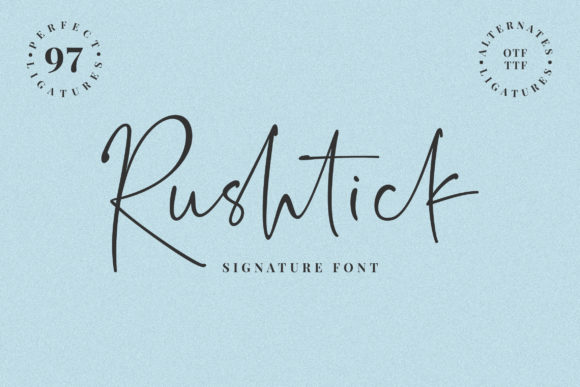
Rushtick isn’t just another handwritten font—it’s a deliberate, lightweight typographic tool designed for clarity and quiet confidence. With its graceful letterforms, subtle irregularities, and balanced rhythm, Rushtick carries an elegant yet approachable intelligence. It doesn’t shout; it invites attention with intention. That makes it especially valuable for professionals and creators who rely on visual language to support thinking, communicating, and delivering work—not distract from it.
Where Rushtick Lives in Real Workflows
Fonts are rarely chosen in isolation. They’re selected as part of a larger decision chain: What’s the message? Who’s receiving it? Where will it appear? How much time do I have? Rushtick enters that chain at moments where authenticity and readability must coexist—like drafting a client proposal before finalizing brand assets, sketching presentation slides during early ideation, or designing printable learning materials for workshops. It’s not meant for body text in long-form reports or dense technical documentation. Instead, it thrives where human tone matters most: headlines, callouts, invitations, personal branding elements, and interface microcopy that benefits from warmth without sacrificing polish.
Think of Rushtick as a workflow companion—not a centerpiece. You might use it while planning a product launch (to draft internal mood boards or pitch decks), during content creation (to label visual storyboards or annotate wireframes), or after a project wraps (to design thank-you cards or reflection summaries). Its light weight means it loads quickly in web projects, and its clean outlines render crisply across devices—making it viable for responsive email templates, Notion dashboards, or Figma prototypes where legibility and aesthetic cohesion matter equally.
Integration Without Friction
Compatibility is non-negotiable in real-world use. Rushtick supports standard Latin character sets and includes OpenType features like ligatures and stylistic alternates—enough flexibility to add nuance without complexity. It works reliably in Adobe Creative Cloud apps, Figma, Canva, and modern browsers. No plugins required. No licensing surprises for commercial use. That simplicity reduces setup time and eliminates version mismatches when collaborating across teams or platforms.
It pairs well with neutral sans-serifs (like Inter, Lato, or Helvetica Neue) for contrast and hierarchy—letting Rushtick carry voice while supporting type handles structure. In print workflows, its generous x-height and open counters hold up even at smaller sizes (14–16pt), making it suitable for hand-lettered-style signage or workshop handouts where digital precision meets tactile feel. For educators building lesson kits or freelancers packaging deliverables, this reliability means less time troubleshooting spacing or fallback fonts—and more time refining substance.
Practical Implementation Tips
- Start small: Use Rushtick only where tone shifts—e.g., section headers in a strategy doc, quote pull-outs in a blog post, or labels in a habit tracker. Avoid overuse; its impact comes from contrast, not coverage.
- Test early, test often: Preview in context—not just in your font menu. Drop it into your actual template (Slack announcement, Google Doc outline, Figma frame) and check how it reads alongside other elements. Does it guide attention—or compete with it?
- Respect line length: Rushtick shines in short bursts. Keep headings under 6 words and call-to-action buttons under 3. Longer lines risk visual fatigue due to its organic flow.
- Match weight to purpose: Rushtick has one primary weight (regular), which is intentional. If you need bold emphasis, use size, color, or spacing—not faux bolding. This keeps output consistent across platforms and avoids rendering inconsistencies.
- Consider accessibility: While elegant, Rushtick isn’t intended for primary UI text or legal disclaimers. Reserve it for non-critical, tone-setting roles—especially where WCAG contrast ratios can be maintained through background choice and sizing.
Workflow Examples Across Roles
For marketers: Rushtick works well in early-stage campaign concepts—used sparingly in email subject lines, social banners, or landing page hero tags. It signals approachability before the brand’s full system locks in. Later, it transitions smoothly into customer-facing assets like limited-edition product labels or event invitations where personality reinforces positioning.
For educators and course designers: Rushtick helps differentiate reflective prompts from instructional text—say, using it for journaling questions inside a PDF workbook or labeling interactive slide categories in a self-paced module. Learners subconsciously register the shift from “information” to “invitation,” supporting engagement without explicit instruction.
For small business owners: Rushtick fits naturally into service-based offerings—think hand-drawn-style invoices, personalized onboarding emails, or printed welcome kits. Because it feels crafted but not fussy, it communicates care without overpromising. And since it’s lightweight, embedding it in Shopify email templates or WordPress headers adds zero performance drag.
For developers and designers documenting tools: Rushtick appears effectively in README headers, CLI output examples, or API documentation sidebars—anywhere you want to soften technical density without undermining authority. It says, “This is precise—but you’re welcome here.”
Long-Term Use: Consistency Over Novelty
Many fonts fade from regular use because they’re hard to scale, inconsistent across formats, or mismatched to evolving needs. Rushtick avoids those pitfalls by staying focused: it’s built for expression within constraints. That focus makes it sustainable. You won’t outgrow it as your work matures—you’ll simply refine how and where you apply it.
Consistency builds recognition. When your team starts associating Rushtick with certain kinds of communication—like internal brainstorming docs or client-facing concept decks—it becomes part of your shared visual vocabulary. That saves cognitive load. No need to re-explain tone in every brief. Just say, “Use Rushtick for the headline and quote—same as last time.”
It also supports quality control. Because Rushtick has limited stylistic variation, there’s less room for inconsistent application. No debating between light/medium/bold weights or choosing between three script variants. One file. One reliable behavior. That reduces revision cycles and speeds up approvals—especially helpful when managing external vendors or junior team members.
Getting Started—Without Overthinking
You don’t need a formal rollout plan to begin using Rushtick. Download it. Install it. Try it in one low-stakes place: your next meeting agenda, a weekly reflection note, or a single slide in your quarterly review deck. Notice how it changes the feel—not just the look—of what you’re saying.
If it feels right, keep it. If not, pause and ask why: Was the context wrong? Was it competing with too much visual noise? Did you use it where neutrality would’ve served better? Rushtick doesn’t require adoption—it rewards alignment. And alignment grows through repetition, not proclamation.
Its elegance isn’t decorative. It’s functional. Its lightness isn’t minimalism for its own sake—it’s efficiency calibrated for human attention. That’s why Rushtick endures in workflows where clarity, warmth, and execution all matter equally.