Lonia: A Handwritten Font That Fits Real Design Workflows
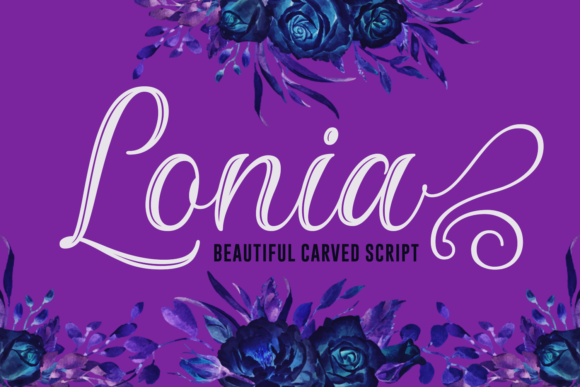
Lonia is a beautifully carved handwritten font with expressive swashes, crafted for designers and creators who need authenticity—not ornamentation—built into their typography. It’s not just decorative; it’s functional. When you choose Lonia, you’re selecting a tool that supports intentionality in visual communication, whether you're crafting a brand identity, designing course materials, preparing a client pitch, or launching a small business website.
Where Lonia Fits in the Creative Process
Typography isn’t an afterthought—it’s part of the planning phase. Before opening design software or writing copy, many professionals ask: *What feeling do I want this to carry?* Lonia answers that question before the first layer is built. Its organic flow and subtle irregularities signal warmth, craftsmanship, and human presence—qualities that resonate strongly in educational content, artisanal branding, wedding stationery, and personal blogs.
Unlike system fonts or overused script fonts, Lonia avoids cliché because its swashes are purposeful, not excessive. Each alternate glyph has been drawn with spacing, rhythm, and readability in mind. That means it integrates cleanly into real-world layouts—not just mockups. You’ll find it working well in combination with clean sans-serifs like Inter or Roboto for contrast, or alongside serif body text like Merriweather for layered hierarchy.
Using Lonia Before the Project Begins
Early-stage planning benefits from visual anchors. When brainstorming a new product launch, workshop series, or content campaign, sketching headlines or taglines in Lonia helps clarify tone before committing to visuals or messaging. Try drafting three variations of your core value statement directly in Figma or Illustrator using Lonia—then step back. Does one version feel more aligned with your audience’s expectations? That’s not just aesthetic preference; it’s feedback on positioning.
For educators building online courses or curriculum guides, testing Lonia in slide headers or worksheet titles early reveals how approachable—or intimidating—the material feels. Its slight variation in stroke weight adds character without sacrificing legibility at 24pt or larger. That makes it viable for printed handouts as well as digital PDFs shared with students or clients.
Integrating Lonia During Execution
Once you’ve moved into active design or development, Lonia performs best when treated like a precision instrument—not a blanket solution. Use it selectively: for logos, hero section headlines, signature quotes, or callout boxes. Avoid setting full paragraphs in Lonia. Its strength lies in emphasis, not endurance.
Compatibility matters. Lonia is available in OpenType format with standard and discretionary ligatures, contextual alternates, and swash variants. That means it works reliably in Adobe Creative Cloud apps (Illustrator, Photoshop, InDesign), Affinity Suite, and modern web environments via @font-face embedding. For web use, pair it with a fallback stack like "Lonia", "Segoe Script", cursive and serve only the weights you need—typically Regular and Swash—to keep page load light.
If you're collaborating across teams—say, a marketer handing off assets to a developer or a designer briefing a copywriter—document where and how Lonia appears. Include usage notes like “Swash only on first letter of headline” or “No all-caps usage.” Consistency builds trust in brand execution, especially when multiple people touch the same files over time.
After Delivery: Maintaining Quality and Flexibility
A font choice doesn’t end when the file is exported. Consider how Lonia holds up across devices and contexts. On mobile screens, large swashes may clip or crowd adjacent elements. Test responsiveness: reduce headline size incrementally and verify spacing remains balanced. If needed, swap to the standard (non-swash) variant for smaller breakpoints—this isn’t a compromise, it’s adaptive design.
Long-term usability also depends on licensing. Lonia is licensed for both personal and commercial use, including SaaS platforms, e-commerce sites, and client deliverables—provided you obtain the appropriate license tier. Always verify usage rights before embedding in templates you distribute or products you sell. Missteps here affect credibility and legal risk, not just aesthetics.
Workflow Integration Examples
- Freelancers pitching creative services: Use Lonia in proposal cover pages and section dividers to convey personality while keeping body text neutral. Clients remember how something felt—not just what it said.
- Small business owners updating social media graphics: Apply Lonia to quote cards or limited-edition announcement banners. Its uniqueness stands out in crowded feeds without requiring animation or complex effects.
- Educators designing printable resources: Combine Lonia headers with a highly legible body font (e.g., Nunito or Open Sans) for worksheets. The contrast supports cognitive processing—students recognize structure faster.
- Bloggers creating lead magnets: Use Lonia for title pages and chapter headings inside downloadable PDFs. It signals care in presentation, increasing perceived value before the reader absorbs a single word of content.
Practical Tips for Smoother Implementation
Start small. Add Lonia to one recurring asset—a newsletter header, a presentation template, or your email signature—and observe how it affects engagement or internal feedback. Track whether colleagues or clients mention the tone shift. That’s real-world validation—not analytics alone.
Organize your font library intentionally. Keep Lonia in a dedicated “handwritten & expressive” folder, separate from utility fonts. This reduces decision fatigue and reinforces its role: intentional accent, not default option.
When pairing fonts, prioritize contrast in function over style. Lonia’s soft curves pair naturally with geometric sans-serifs (like Montserrat or Poppins) because they balance each other structurally—not just visually. Avoid other script fonts nearby; competition dilutes impact.
For print projects, always export test prints at 100% scale. Screen rendering smooths edges; physical ink reveals texture. Lonia’s carved quality translates beautifully to letterpress or foil stamping—but only if you’ve verified spacing and weight distribution on paper first.
What Makes Lonia Sustainable in Your Toolkit?
It’s not about trend alignment. It’s about repeatability. A font you reach for across multiple projects—without second-guessing legibility, licensing, or tone—is one that earns its place. Lonia succeeds here because its swashes are restrained, its character set complete, and its voice distinct but not demanding.
Think of it like a well-worn notebook: familiar, reliable, expressive in context—not everywhere, but exactly where it counts. That kind of consistency supports efficiency, reduces revision cycles, and strengthens brand recall over time.
Whether you're refining a logo system, preparing a grant application, designing packaging for a local maker, or building a portfolio site, Lonia offers a quiet confidence. It doesn’t shout. It invites attention—then delivers meaning through craft. And in workflows where clarity, authenticity, and execution speed matter most, that’s not just practical. It’s essential.